Contract Review AI Software: A Practical Checklist
Zedly AI Editorial TeamJanuary 23, 202610 min read
Contract review has a reputation problem: it's important, everyone knows it's important, and yet it still happens by Ctrl+F and prayer. You know the drill: search for "indemnif," hope you catch the variations, skim the limitation of liability section, and pray nothing critical is buried in an exhibit.
Contract review AI promises to fix this, but the category is crowded with tools that range from genuinely useful to barely functional. This guide cuts through the marketing. You'll learn what contract review AI actually does, which clauses it should catch, how to validate accuracy, and what privacy controls matter.
There's a downloadable checklist for the clauses themselves, and a buying guide that focuses on capabilities rather than brand names. (Looking for a hands-on tool? See our AI contract extraction overview.)
What Is Contract Review AI Software?
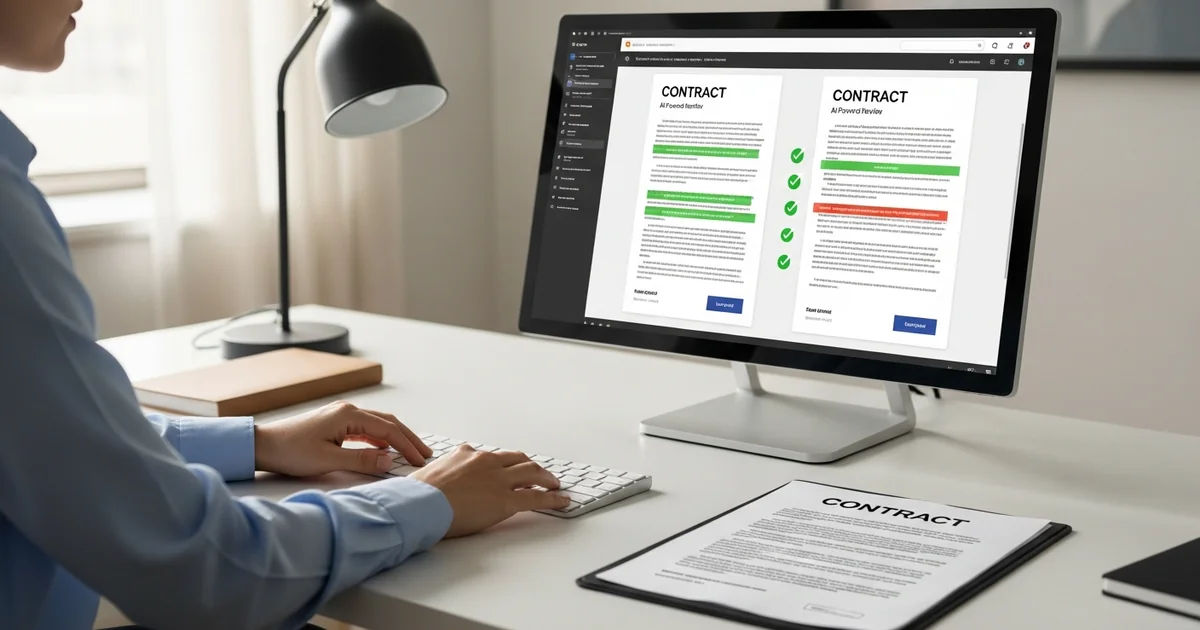
Contract review AI reads contracts and extracts structured information (clauses, obligations, dates, parties, and risk factors) faster than manual review. The technology has matured significantly in the past two years, moving from basic keyword matching to genuine language understanding. Here's what modern tools actually do:
Clause Extraction
The core function: identify and extract specific clause types from contracts. Good tools can find termination provisions, indemnification language, limitation of liability caps, IP assignments, and confidentiality terms regardless of how they're labeled in the document. A "Limitation of Liability" section might be called "Cap on Damages" or buried in "General Provisions," and the AI should find it anyway.
Risk Flagging
Beyond extraction, some tools assess risk. They might flag an unlimited indemnity, a unilateral termination right, or an unusually broad IP assignment. Risk flagging is only useful if you can see why something was flagged, specifically the language that triggered the alert. Without that context, you're trusting a score you can't verify.
Summaries with Source References
AI can summarize long contracts into digestible overviews: "This is a 3-year SaaS agreement with auto-renewal, mutual indemnification, and a liability cap of 12 months' fees." The critical feature is source references: links back to the exact language that supports each summary point. Summaries without citations are shortcuts to mistakes.
Comparison Across Versions and Templates
Upload your standard NDA and a vendor's proposed version. The AI identifies deviations: added language, removed protections, modified definitions. This comparison workflow is where contract AI delivers the most time savings. What takes an hour of side-by-side reading becomes a 5-minute review of flagged differences.
Who It's For (And Who It's Not)
Contract review AI serves different users in different ways:
Solo Attorneys and Small Firms
Limited support staff means you're doing your own document review. AI accelerates first-pass review, helping you identify key terms across a stack of contracts without reading every word. The ROI is direct: hours saved on routine extraction work.
In-House Counsel
You're reviewing contracts from every department: sales agreements, vendor contracts, partnership deals, employment agreements. AI helps you maintain consistency (does this vendor contract match our standard terms?) and catch issues before they become problems (this auto-renewal clause needs attention before Q4).
Procurement and Vendor Management
You're not a lawyer, but you're responsible for vendor contracts. AI helps you flag terms that need legal review, extract key dates for renewal tracking, and compare vendor proposals against your requirements. You're triaging, not practicing law. For a step-by-step walkthrough of what to check in a vendor agreement, see our vendor contract review checklist.
Founders and Business Operators
You're signing contracts without dedicated legal support. AI helps you understand what you're agreeing to, identify terms that seem unusual, and know which clauses deserve a conversation with outside counsel. It's a sanity check, not legal advice.
Important: Contract review AI is not a lawyer replacement and does not provide legal advice. It's a tool that helps you find and organize information in contracts. For legal interpretation, negotiation strategy, or advice on contract terms, consult a qualified attorney. The AI tells you what the contract says; it doesn't tell you what you should do about it.
What It Should Catch: The Real Checklist
Here's what competent contract review AI should identify. This isn't an exhaustive list of every possible contract term; it's the clauses that matter most in commercial agreements and where extraction errors are most costly.
Clause Type
What to Look For
Term / Renewal / Auto-Renewal
Initial term length, renewal periods, auto-renewal triggers, notice window for non-renewal (30 days? 90 days?), evergreen provisions
Termination
Termination for convenience (either party? only one?), termination for cause/breach, cure periods, termination fees, survival clauses
Indemnity
Scope of indemnification, mutual vs. one-sided, duty to defend vs. duty to indemnify, carve-outs for gross negligence/willful misconduct, IP indemnity
Limitation of Liability
Liability cap amount (fees paid? annual fees? fixed cap?), exclusions from cap (indemnity, IP, confidentiality), consequential damages waiver, carve-outs
IP Ownership / Work Product
Who owns deliverables, work-for-hire provisions, license grants (scope, exclusivity, territory), background IP vs. foreground IP, moral rights waivers
Confidentiality
Definition of confidential information, exclusions (public info, prior knowledge, legal compulsion), term of confidentiality obligations, return/destruction requirements
Assignment / Change of Control
Assignment restrictions, consent requirements, change of control triggers (merger, acquisition, change in ownership %), assignment to affiliates
Governing Law / Venue
Choice of law, exclusive jurisdiction, venue requirements, jury waiver, arbitration clauses, class action waivers
Payment Terms
Payment timing (net 30? net 60?), late payment fees/interest, audit rights, price escalation provisions, most favored customer clauses
Data Security / Privacy
Data processing terms, DPA requirements, subcontractor/subprocessor flow-down, breach notification obligations, data localization requirements
Get this 12-clause checklist as a printable PDF. Use it during your next contract review to ensure you're catching what matters.
We'll email the download link immediately. No spam. Unsubscribe anytime.
How "Accuracy" Works (And How to Validate)
Every contract AI vendor claims high accuracy. Here's how to actually evaluate it:
Why Citations Matter
A tool that says "there's a 12-month liability cap" is only useful if it shows you where in the contract that appears. Citations (page numbers, section references, or highlighted text) let you verify the extraction. Without citations, you're trusting the AI blindly, which defeats the purpose of review. For a full breakdown of citation formats (section numbers, PDF page references, exhibits, and amendments), see our guide on how to cite a clause in a contract.
Good citation practices include:
Page/section linking: Click the extraction, jump to the source
Text highlighting: See exactly which words the AI relied on
Confidence indicators: Know when the AI is certain vs. guessing
How to Spot Hallucinations
AI can confidently state things that aren't in the contract, a phenomenon called hallucination. Common patterns:
Fabricated specifics: "The liability cap is $500,000" when the contract actually says "fees paid in the prior 12 months"
Assumed defaults: "Governing law is Delaware" when no governing law is specified
Misattributed obligations: Confusing which party has which obligation
The fix: always check citations. If the AI claims something exists, verify the source language. If there's no citation, treat the output as a hypothesis to confirm.
Human-in-the-Loop Review Workflow
The most effective contract AI workflows keep humans in control:
AI extracts: Tool identifies clauses and surfaces key terms
Human verifies: Reviewer checks citations for critical extractions
Human decides: Reviewer flags issues, drafts negotiation points, or approves
The AI accelerates the "find" step; humans own the "evaluate" and "decide" steps. Tools that try to skip human verification are optimizing for speed at the cost of accuracy.
When PDFs Are Messy or Scanned
Contract AI works best on clean, text-based PDFs. Reality is messier:
Scanned documents: Require OCR, which introduces character recognition errors
Poor formatting: Tables, columns, headers/footers can confuse extraction
Embedded images: Text in images won't be extracted
Handwritten annotations: Generally not readable by AI
Best practice: test the tool with your actual documents before committing. A demo with clean sample contracts doesn't predict performance on your real-world files.
Privacy and Confidentiality (Why It Matters)
Contracts contain some of your most sensitive business information: pricing, terms, counterparty relationships, strategic plans. Where you process them matters.
Don't Paste Contracts into Random Chat Tools
It's tempting: copy a contract clause into ChatGPT and ask what it means. The problem: consumer AI tools typically use your inputs for model training, have broad data retention policies, and lack enterprise security controls. Your confidential contract terms could end up influencing outputs for other users or stored in ways you can't control.
For anything beyond public information, use purpose-built tools with clear data handling policies.
Storage and Retention Policy Choices
Key questions to ask any contract AI vendor:
Where is data stored? Region, cloud provider, data center locations
How long is data retained? During processing only? Until you delete? Forever?
Is data used for training? Your contracts should not train public models
Can you delete data? On-demand deletion, automated retention limits
Customer Isolation
In multi-tenant systems, your data should be logically (and ideally physically) isolated from other customers. Ask about:
Namespace separation: Your queries can't access other customers' documents
Encryption: At rest and in transit, with customer-specific keys if possible
Access controls: Who at the vendor can access your data, and under what circumstances
Skip the feature comparison charts and focus on capabilities that actually matter. Here's what to evaluate:
Citations + Page/Section Linking
Can you click an extracted term and jump to the source? Is the relevant text highlighted? Without this, you're trading one form of manual review (reading the contract) for another (hunting for where the AI found something).
Batch Review + Cross-Contract Search
Can you upload 50 vendor contracts and search across all of them? "Show me every auto-renewal clause" or "which contracts have liability caps under $100K?" This is where AI scales: reviewing one contract at a time is helpful, but reviewing your entire contract portfolio is transformative.
Saved Workflows and Repeatable Checklists
If you review NDAs regularly, you shouldn't reconfigure the tool every time. Look for:
Saved extraction templates: "Run my standard vendor contract checklist"
Custom clause libraries: Train the tool on your specific terminology
Exportable Structured Outputs (CSV/JSON)
Extracted data should be portable. Can you export clause extractions to a spreadsheet? Feed them into your contract management system? If data goes in but can't come out in structured form, the tool is a silo.
Redaction and Sensitive Data Handling
Before sharing contracts externally, you may need to redact pricing, names, or other sensitive terms. Built-in redaction tools save a step. Also consider: does the tool flag PII automatically? Can you process documents without retaining them?
Admin Controls and Audit Logs
For teams: who can access what? Who reviewed which contract? When was a document uploaded, and by whom? Audit logs matter for compliance and for understanding your own workflows.
Pricing Transparency
Contract AI pricing models vary wildly: per document, per page, per user, per seat, usage-based, enterprise agreements. Understand:
What counts as a "document" or "page"?
Are there processing limits?
What happens if you exceed your tier?
Is there a free trial to test with your actual documents?
Example Workflow: What Users Actually Do
Here's a practical workflow for reviewing a vendor agreement using contract AI. This assumes you're evaluating a new SaaS vendor with an MSA, Order Form, and DPA.
Step 1: Upload MSA + Order Form + DPA
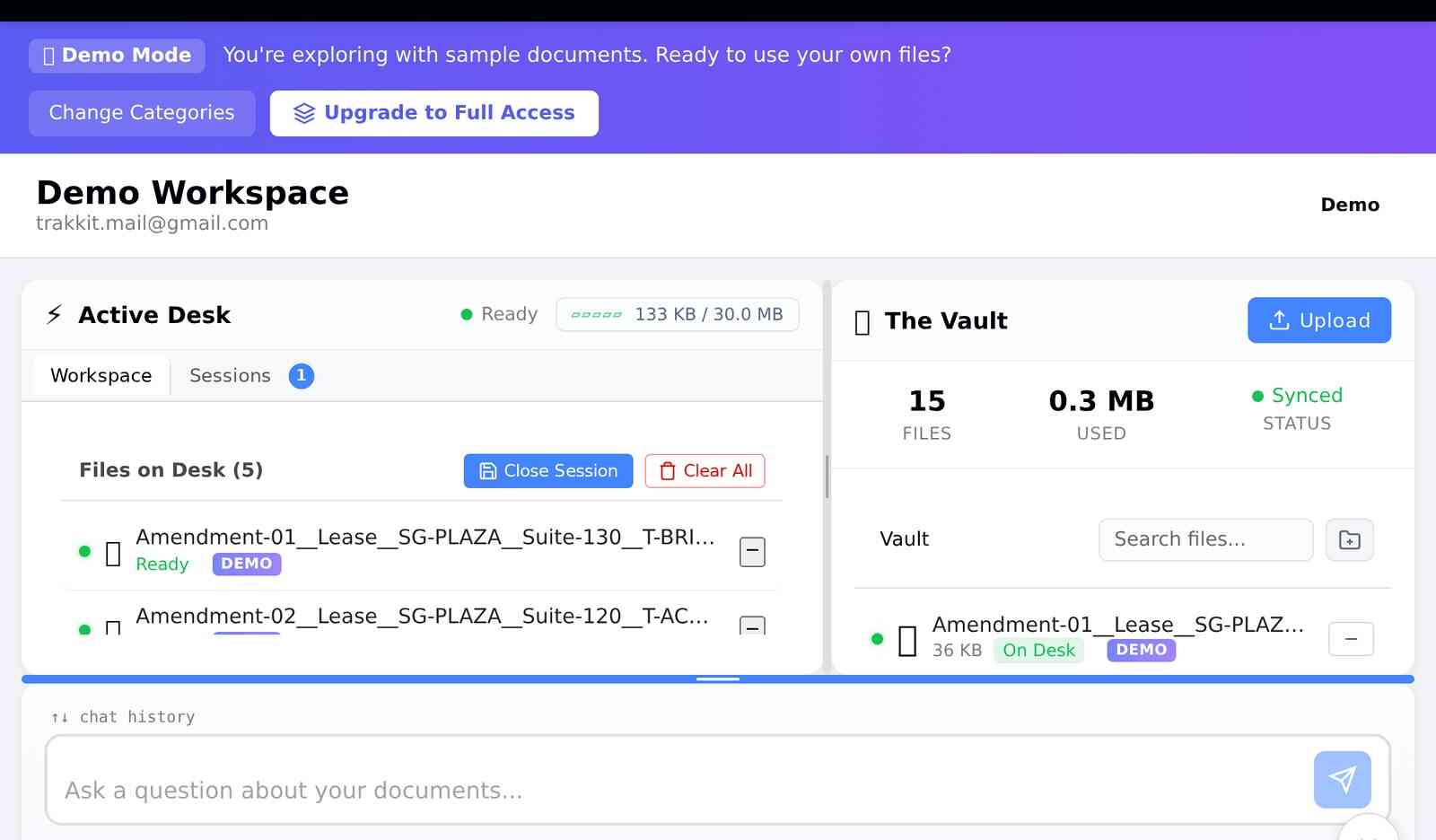
Add all related documents to a single session or workspace. Keeping them together lets you cross-reference: the MSA might reference terms defined in the DPA, or the Order Form might modify MSA provisions.
Upload related documents together for cross-reference during review
Step 2: Run "Vendor Risk Triage" Session
Start with a high-level pass: ask the AI to identify the most important terms and any obvious red flags. Questions like:
"Summarize the key commercial terms"
"What are the termination provisions?"
"Flag any unusual or one-sided terms"
Step 3: Extract Key Clauses into a Table
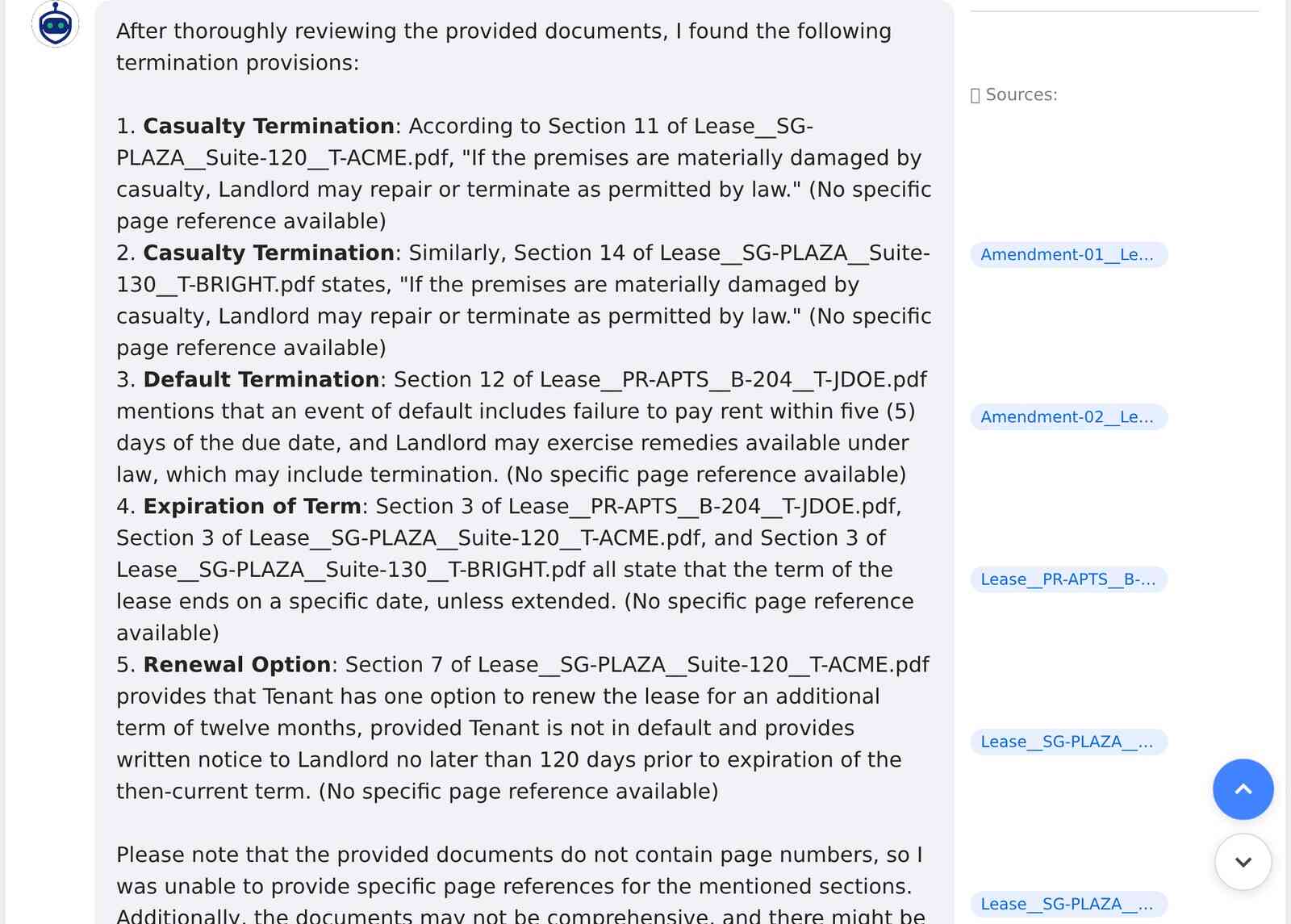
Use the checklist from Section 3. Ask the AI to extract each clause type and present them in a structured format. This becomes your review artifact, a single view of everything that matters.
Clause extraction with source citations for verification
Step 4: Ask Targeted Questions
Drill into specifics:
"Is there auto-renewal? What's the notice period?"
"What's the liability cap? Are there carve-outs?"
"Who owns work product created during the engagement?"
"What happens to our data if we terminate?"
Step 5: Compare to Your Standard Language
If you have a preferred position (your standard NDA, your template MSA), upload it and ask for a comparison. The AI identifies where the vendor's language deviates from yours. These are your negotiation points.
Step 6: Produce Negotiation Notes + Fallback Language
For each deviation, document:
What they proposed
What you'd prefer
Fallback position if they push back
This becomes your negotiation playbook, a structured list of asks with supporting rationale.
How Zedly AI Fits
Zedly provides contract review capabilities built on private-by-design document analysis. Here's how it maps to the criteria above:
Private Vault and Active Desk
Store contracts in the Vault with configurable retention. Move documents to the Active Desk for analysis, where only active documents are processed. When you're done, clear the Desk. The separation keeps storage and analysis distinct, with clear boundaries for what's being queried.
Saved Sessions
Save your contract review sessions for future reference. Return to a vendor review months later with full context: what you asked, what the AI found, what you decided. Sessions become institutional memory.
Citation-Backed Answers (Sources Panel)
Every extraction includes source references. Click a finding to see the exact contract language that supports it. The sources panel shows you what the AI relied on, with no black-box outputs.
Cross-Contract Search
Search across all contracts on your Active Desk. "Show me all limitation of liability clauses" works across 5 documents or 50. Build portfolio-wide views of your contract exposure.
Structured Outputs
Export extractions as structured data. Feed clause tables into your contract management system, share summaries with stakeholders, or build your own analysis on top of extracted terms.
Accuracy depends on the tool and how you use it. The best contract review AI provides citations (page numbers, section references, or highlighted passages) so you can verify every extracted clause. Without citations, you're trusting a black box. With citations, the AI becomes a research assistant that points you to the right language, which you then confirm. Expect 85-95% accuracy on well-formatted PDFs; always verify critical terms manually.
Can contract review AI replace a lawyer?
No. Contract review AI accelerates the review process: it finds clauses faster, flags potential risks, and organizes information. But it doesn't provide legal advice, understand your business context, or negotiate on your behalf. Think of it as a tool that helps lawyers and business teams work more efficiently, not a replacement for legal judgment. The AI surfaces what's in the contract; humans decide what to do about it.
Is it safe to upload confidential contracts to AI tools?
It depends entirely on the tool. Consumer AI chatbots typically use your inputs for model training and lack enterprise security controls. Purpose-built contract review tools should offer: no training on your data, customer isolation, configurable retention policies, and clear data governance. Before uploading sensitive contracts, ask about storage location, retention periods, access controls, and whether your data is used for any purpose beyond serving your request.
Can contract review AI compare two contracts or handle redlines?
Many contract review tools support comparison workflows. You can upload two versions of an agreement (or a contract vs. your standard template) and ask the AI to identify differences, missing clauses, or deviations from your preferred language. The quality varies: some tools do true clause-by-clause comparison, others just highlight text differences. For redline workflows, look for tools that can map extracted clauses across documents.
What file formats work best for contract review AI?
Text-based PDFs work best. These are PDFs where you can select and copy text. Scanned PDFs (images of documents) require OCR, which introduces extraction errors. Word documents (.docx) are also reliable. For best results: use native digital documents when possible, ensure scans are high quality if unavoidable, and test the tool with your actual contracts before committing to a workflow.
Looking for enterprise-grade legal AI?
See how Zedly AI handles contract review, clause extraction, NDA analysis, and due diligence for law firms and in-house counsel — with deployment options that match your security policy. Explore Legal AI →
Try Contract Review with Zedly AI
Upload a contract and get clause extraction with citations. See exactly where each term appears, search across multiple documents, and export structured outputs for your workflow.