How to Search Across Multiple Lease Agreements at Once (Find Any Clause in Minutes)
Zedly AI Editorial TeamJanuary 5, 20268 min read
Property managers and asset teams spend countless hours hunting for specific clauses buried in lease agreements. Whether you need to find rent escalation clauses from multiple lease agreements or extract renewal clause from multiple lease agreements before a critical deadline, the manual approach doesn't scale. This guide shows you how to search across multiple lease agreements at once,turning days of document review into minutes of precise, cited answers.
Modern lease clause search software makes portfolio-wide search possible without reading every page yourself. The key is understanding what to look for, how to ask the right questions, and how to avoid the pitfalls that trip up even experienced teams. For a broader look at AI-powered search across any document type, see our guide to searching across multiple PDFs at once.
Why Lease Clause Search Is Harder Than It Should Be
If you've ever tried to find a specific clause across 50, 100, or 500 leases, you know the pain. The problem isn't just volume,it's the chaos that accumulates over years of deal-making.
PDF Sprawl Across Multiple Systems
Leases live in shared drives, email attachments, property management systems, and sometimes filing cabinets that never got digitized. Finding every version of every lease is often harder than searching the documents themselves. Teams waste hours just assembling the stack before any real analysis begins.
Inconsistent Wording Across Landlords, Tenants, and Eras
A "rent escalation" clause might be labeled "Annual Adjustment," "CPI Increase," "Rent Bump Schedule," or buried in a section called "Base Rent Modifications." The same concept appears under different headings depending on who drafted the lease and when. Keyword search fails because there's no standard vocabulary across real estate law.
Scanned Documents and Poor OCR
Older leases were scanned from paper, often at low resolution or with handwritten amendments. Standard text search returns nothing because the PDF is just an image. Even when OCR exists, misread characters ("cl" becoming "d," "0" becoming "O") mean critical clauses slip through the cracks.
What You Actually Need from Lease Clause Search Software
Not all AI document tools are built for real estate workflows. Here's what separates useful lease clause search software from generic chatbots.
Portfolio-Wide Search Across All Agreements
You need to query your entire lease portfolio at once,not upload one document at a time. The software should let you ask a single question and return results from every relevant lease, with citations showing exactly where each answer came from.
Exact Citations with Page Numbers
Answers without sources are useless in real estate. When you find a renewal option or maintenance responsibility, you need the exact page and section reference. This lets you verify the AI's interpretation and include the citation in reports, emails, or legal correspondence.
Permissioning and Access Control
Different team members need different access. Leasing agents might see active tenant files while asset managers access the full portfolio. Your lease clause search software should respect these boundaries, not expose everything to everyone.
Audit Trails for Compliance
For institutional portfolios, you need to prove who searched what, when, and what they found. Audit trails matter for SOX compliance, investor reporting, and internal governance. The best tools log every query and result automatically.
The 5 Clauses Property Teams Search Most Often
While every portfolio has unique needs, these five clause types account for the majority of lease searches. Understanding what you're looking for helps you write better queries.
1. Renewal and Option Language
Renewal options dictate whether tenants can extend their term and under what conditions. Missing a renewal notice deadline can cost months of vacancy or force unfavorable negotiations. Teams search for renewal language to build expiration calendars and plan tenant retention strategies.
Escalation clauses determine how rent increases over the lease term. Some use fixed percentages, others tie to CPI or fair market value adjustments. Extracting these schedules across multiple leases lets you forecast revenue and compare tenant economics.
3. Notice Requirements
Leases specify notice periods for renewal, termination, maintenance access, and default remedies. These windows are often 30, 60, 90, or 180 days,and missing them triggers automatic consequences. Searching notice requirements helps teams build compliance calendars.
4. CAM and Pass-Through Language
Common Area Maintenance (CAM) recoveries vary wildly by lease. Some tenants pay proportionate share, others have caps, exclusions, or gross-up provisions. Extracting CAM language lets property accountants reconcile charges accurately and avoid disputes. Learn more in our guide to CAM reconciliation software for commercial landlords.
5. Maintenance and Repair Responsibilities
Who fixes the HVAC? Who replaces the roof? Maintenance responsibilities shift between landlord and tenant depending on the lease structure. Searching these clauses helps operations teams route work orders correctly and budget for capital expenses.
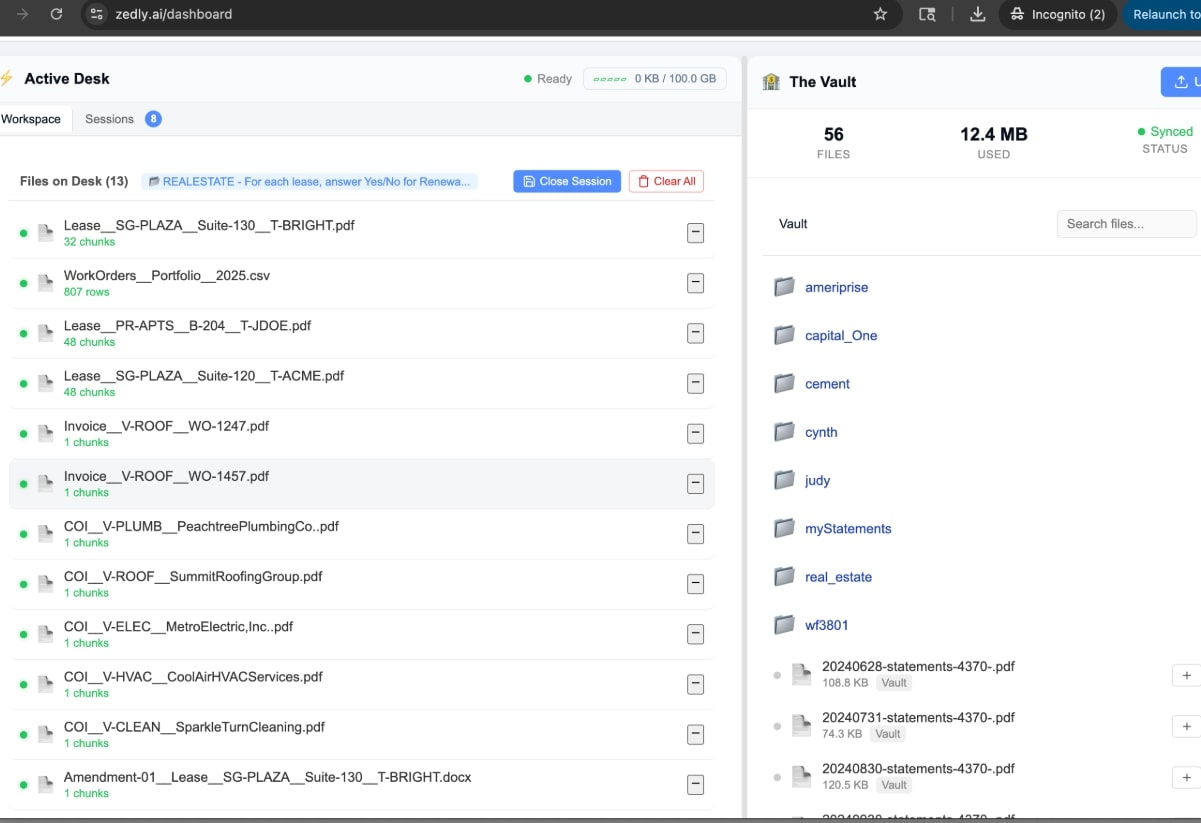
Search across leases and invoices simultaneously to extract clauses, verify charges, and reconcile data.
Step-by-Step: How to Search Multiple Leases for the Same Clause
Follow this workflow to get accurate, comprehensive results from your lease portfolio.
Step 1: Prepare Your Leases (Naming, Folders, Versions)
Before searching, organize your documents. Use consistent naming conventions that include property name, tenant, and lease effective date. Group leases by property or portfolio in folders. Identify which version is the current executed lease versus drafts or expired agreements.
Upload all relevant documents to your lease clause search software. Most tools accept PDFs directly, native PDFs work best, but good OCR handles scans. Tag documents with metadata like property type, square footage, or tenant category if your tool supports it.
The quality of your results depends on how you phrase your questions. Use specific, consistent language across searches. Instead of "show me renewals," ask "What are the renewal option terms, including notice period, renewal term length, and rent during renewal for each tenant?"
Create query templates for your most common searches. Reusing the same phrasing ensures comparable results across different lease sets and time periods. Save your best-performing queries in a shared location so the whole team benefits.
Step 3: Save Results to a Clause Library
Don't lose your work. Export search results to a structured format-spreadsheet, database, or your property management system. Build a clause library that captures the extracted language, source document, page number, and extraction date.
This library becomes your single source of truth. When someone asks about a specific tenant's renewal terms, you can answer in seconds instead of re-searching. Update the library when leases are amended or renewed.
Example Queries to Copy and Paste
Use these query templates as starting points. Modify them based on your specific portfolio needs and the clause language common in your leases.
Renewal Options
"Show the renewal option language for all tenants, including the notice deadline, number of renewal terms available, renewal term length, and how rent is determined during renewal."
This query extracts the complete renewal picture. It catches both simple one-term renewals and complex multi-option structures with fair market value resets.
Rent Escalation Schedules
"Find all rent escalation clauses and summarize the escalation schedule, including whether increases are fixed percentage, CPI-based, or fair market adjustments. Include the timing and calculation method."
This captures the variety of escalation structures across your portfolio. The "calculation method" prompt helps distinguish between straightforward bumps and complex CPI formulas with floors and ceilings.
Notice Requirements
"Extract all notice requirements from each lease, including notice periods for renewal, termination, default cure, and landlord access. Specify the number of days and any delivery requirements."
This builds your compliance calendar foundation. Delivery requirements matter, some leases require certified mail or personal delivery for notices to be valid.
CAM and Operating Expenses
"Show the CAM and operating expense provisions for each tenant, including whether they pay proportionate share, any caps or exclusions, gross-up provisions, and reconciliation timing."
This query surfaces the accounting complexity hidden in your leases. Caps and exclusions dramatically affect recoverable amounts and need to be tracked at the tenant level. For a deeper dive into CAM reconciliation workflows, see Best CAM Reconciliation Software for Commercial Landlords.
Maintenance Responsibilities
"List the maintenance and repair responsibilities for landlord and tenant in each lease, including HVAC, roof, structural elements, and common areas. Note any dollar thresholds or approval requirements."
This helps operations teams understand who's responsible for what. Dollar thresholds often determine whether repairs need landlord approval or fall entirely on the tenant.
Common Pitfalls (And How to Avoid Bad Answers)
Even the best lease clause search software can produce incorrect results. Knowing these failure modes helps you catch problems before they cause real damage.
Hallucinations and Invented Clauses
AI models sometimes generate plausible-sounding language that doesn't exist in your documents. This is especially dangerous for lease analysis where fabricated terms could mislead negotiations or compliance decisions. Always verify AI answers against the cited source page before acting on them.
Look for tools that provide exact quotes with page citations. If the AI summarizes without showing source text, treat the answer with extra skepticism. The best systems let you click through to the original document to verify.
Missing Pages and Incomplete Documents
Scanned leases often have missing pages, especially exhibits and amendments. The AI can only search what it can see, if the rent schedule exhibit didn't scan properly, escalation searches will miss critical information. Spot-check results against your document page counts.
Before major searches, verify your uploads are complete. Page counts should match the original documents. Re-scan or obtain better copies of documents with OCR issues or missing sections.
Wrong Version of the Lease
Amendments, extensions, and restated leases create version control nightmares. If your folder contains both the original 2018 lease and the 2023 amendment, the AI might return language that's been superseded. Establish clear protocols for which document represents the current terms.
Use naming conventions that indicate version status. Archive superseded documents separately from active leases. Some teams maintain a "current executed lease" folder that only contains the governing version for each tenant.
Workflow: From Clause Search to Abstraction to Operations
Searching for clauses is just the beginning. The real value comes from connecting lease intelligence to operational workflows.
Build Abstracts from Search Results
Use your clause searches to populate lease abstracts automatically. Instead of manually reading every lease to fill out abstract templates, run targeted queries for each field. The AI extracts, you verify, and your abstract database stays current.
Feed CAM Reconciliation with Extracted Terms
CAM calculations require tenant-specific terms: proportionate share, caps, exclusions, base year amounts. Extract these once, store them in your property accounting system, and reconciliations become audit-ready. No more hunting through PDFs during year-end close.
Route Maintenance Requests Correctly
When a work order comes in, your team needs to know: is this the landlord's responsibility or the tenant's? With maintenance clauses extracted and searchable, dispatch decisions take seconds. Charge-backs are documented with lease citations that prevent disputes.
Track Critical Dates Proactively
Notice requirements and renewal deadlines drive the critical date calendar. Rather than building this calendar manually, extract the dates from your lease search and feed them into your task management system. Automated reminders prevent missed deadlines and costly defaults.
Try It on Your Lease Stack
The fastest way to understand lease clause search is to try it on your own documents. Upload a handful of leases, run the example queries above, and see how quickly you can extract the clauses that usually take hours to find manually.
Zedly AI's document intelligence platform handles portfolio-wide lease search with exact citations, permissioning, and audit trails built in. Whether you're managing ten properties or ten thousand, the workflow scales to match your portfolio.
Start with our interactive demo to see how lease clause search works on sample documents, then bring your own leases to experience the full workflow. Your next CAM reconciliation, renewal negotiation, or compliance audit will thank you.
Ready to get started?
Private-by-design document analysis with strict retention controls.