Best CAM Reconciliation Software for Commercial Landlords
Zedly AI Editorial TeamJanuary 16, 202612 min read
Commercial landlords, are you drowning in spreadsheets, swimming against the tide of complex lease agreements, and constantly battling CAM reconciliation headaches? You're not alone. Common Area Maintenance (CAM) reconciliation is a major pain point for commercial property owners, often leading to lost revenue, tenant disputes, and a whole lot of wasted time.
But what if there was a better way? Let's explore how the right CAM reconciliation software can transform your property management operations and boost your bottom line.
What Are CAM Charges in Commercial Real Estate?
Before diving into software, it helps to understand what you're reconciling. Common Area Maintenance (CAM) charges are the shared operating costs that tenants pay to landlords for maintaining the common areas of a commercial property. These areas benefit every tenant in the building, so the costs are split among all occupants rather than charged to any single lease.
Common CAM Expense Categories
CAM expenses vary by property type, but most commercial leases include some combination of the following:
Building maintenance: structural repairs, HVAC servicing, elevator maintenance, plumbing
Landscaping and grounds: lawn care, snow removal, irrigation, exterior lighting
Parking lot upkeep: repaving, striping, lighting, signage
Janitorial and cleaning: common area lobbies, restrooms, hallways
Security: on-site guards, surveillance systems, access control
Utilities: electricity, gas, and water for shared spaces
Insurance: property and liability coverage for common areas
Property management fees: administrative overhead, typically capped at 3–5% of total operating costs
Controllable vs. Uncontrollable Expenses
An important distinction in many leases is between controllable expenses (landscaping, janitorial, general repairs) and uncontrollable expenses (property taxes, insurance premiums, utility rate changes). Many tenants negotiate a controllable expense cap, often 3% to 5% per year, while uncontrollable costs pass through without a ceiling.
CAM in NNN vs. Gross Leases
CAM charges appear most prominently in triple-net (NNN) leases, where the tenant pays base rent plus property taxes, insurance, and CAM. In a gross lease, the landlord bundles operating expenses into the rent and absorbs cost fluctuations. Most commercial office and retail properties use some variation of NNN or modified gross structures, making CAM reconciliation an annual necessity.
How Pro-Rata Share Is Calculated
Each tenant's share of CAM costs is determined by their pro-rata share, the percentage of the building they occupy. The formula is straightforward:
Pro-Rata Share = Tenant's Leased SF ÷ Building's Total GLA (Gross Leasable Area)
For example, a tenant leasing 5,000 SF in a 100,000 SF building has a 5% pro-rata share. If the building's total CAM expenses for the year are $400,000, that tenant owes $20,000.
Understanding Expense Caps
Leases frequently include caps that limit how much a tenant pays for certain CAM categories. The most common types are:
Fixed cap: a hard dollar limit per expense type (e.g., $10,000/year for building maintenance).
Over-base cumulative cap: a maximum percentage increase applied to a base-year amount each year. For example, a $10,000 base with a 5% cumulative cap yields limits of $10,500 in year 2, $11,000 in year 3, and so on.
Over-base compounded cap: the same percentage increase, but compounded. The $10,000 base at 5% compound yields $10,500 in year 2, $11,025 in year 3, $11,576 in year 4.
Over-year cap: the percentage increase applies to the previous year's actual expense rather than the original base amount.
Tracking these caps correctly across dozens or hundreds of leases is where manual spreadsheets break down. That is where software becomes essential.
The CAM Reconciliation Nightmare: Challenges for Commercial Landlords
Let's face it: CAM reconciliation is rarely anyone's favorite task. It's a complex, detail-oriented process fraught with potential pitfalls. One of the biggest challenges lies in the sheer variety and complexity of CAM clauses found in commercial leases.
Each lease can contain unique terms, exclusions, and calculation methods for allocating common area expenses. Deciphering and applying these different clauses manually is a recipe for errors and inconsistencies.
And then there's the time factor. Manual CAM reconciliation, relying heavily on spreadsheets and manual data entry, is incredibly time-consuming.
Property management teams spend countless hours gathering data, performing calculations, and generating reports. This not only diverts resources from more strategic initiatives but also increases the risk of human error. Think transposed numbers, incorrect formulas, and missed deadlines, all contributing to potential financial losses.
Inaccurate CAM charges can trigger a cascade of negative consequences. Lost revenue is an obvious one, as undercharging tenants directly impacts your profitability. But tenant disputes can be even more damaging, leading to strained relationships, costly legal battles, and even tenant turnover.
Moreover, traditional CAM reconciliation processes often lack transparency and auditability, making it difficult to track expenses, justify charges, and demonstrate compliance with standards like ASC 842 and IFRS 16.
Example: A landlord with 50 tenants, each with unique CAM clauses related to parking, landscaping, and security, manually calculating and reconciling these charges each year. The process takes weeks, involves multiple team members, and is prone to errors, leading to tenant disputes and revenue leakage.
Understanding the complexity of CAM clauses: varying terms, exclusions, and calculation methods.
Time-consuming manual reconciliation: spreadsheets are error-prone.
Financial risks of inaccurate CAM: lost revenue, disputes, legal issues.
Operational burden: resource allocation, data entry, reporting.
Lack of transparency: auditability in traditional processes.
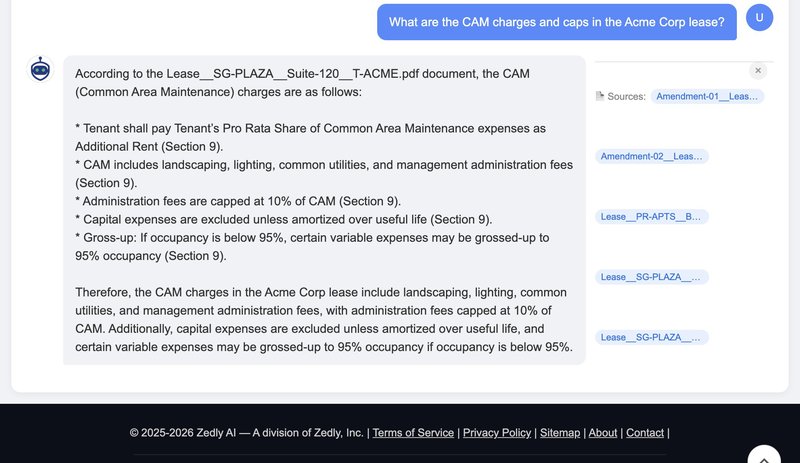
Zedly AI automatically extracts CAM charges and caps from lease documents, eliminating manual spreadsheet work
Key Features to Look for in CAM Reconciliation Software
So, what should you look for in CAM reconciliation software to escape this nightmare? The ideal solution should automate key processes, improve accuracy, and enhance transparency. Here are some must-have features:
Automated lease data extraction and abstraction: The ability to accurately extract relevant CAM clauses and financial data from lease agreements is paramount. AI-powered lease abstraction tools dramatically improve accuracy and speed.
Customizable CAM calculation templates: Flexibility to adapt to diverse lease terms, pro-rata methods, and cap structures is crucial. One size does not fit all when it comes to CAM clauses.
Automated invoice processing and expense tracking: Seamless integration with accounting systems and ERPs (SAP, Oracle, QuickBooks) to streamline data flow is a huge time-saver.
Variance analysis and reporting: Tools to identify discrepancies, track expenses year over year, and generate comprehensive reports are essential for effective management.
Audit trail and documentation: A clear record of all calculations, adjustments, and approvals for compliance, especially under ASC 842 and IFRS 16.
Tenant portal for transparency and communication: Providing tenants with access to CAM calculations and supporting documentation fosters trust and reduces disputes.
Expense cap tracking: Automatic enforcement of fixed, cumulative, and compounded caps across every lease condition to prevent overbilling.
Think about it: how much time could you save if your software automatically pulled CAM-related data directly from your leases? What if you could generate detailed reports with just a few clicks? These are the kinds of capabilities that can transform your CAM reconciliation process from a burden to a breeze.
Top CAM Reconciliation Software Compared
Choosing the right CAM reconciliation software depends on your portfolio size, lease complexity, and tech stack. Here is how the leading platforms stack up:
Zedly AI
Best for: Landlords and CRE teams that need to extract and analyze CAM data from lease documents quickly, without per-seat licensing or complex onboarding.
AI-powered lease abstraction pulls CAM clauses, expense categories, allocation percentages, and caps directly from PDFs.
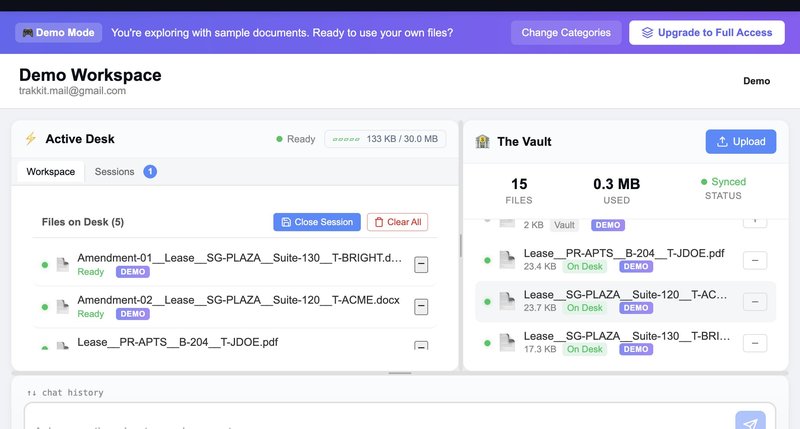
Privacy-first architecture: documents are processed in ephemeral sessions and never stored after analysis.
Cross-portfolio search lets you query CAM terms across hundreds of leases at once.
Best for: Commercial landlords seeking a modular, open-platform approach to property management and CAM.
Flexible CAM reconciliation modules that integrate with MRI's broader commercial suite.
Open API ecosystem allows custom integrations with third-party tools.
Strong in commercial office and retail verticals.
Module-based pricing can add up for smaller portfolios.
No single platform is perfect for every landlord. For teams that need AI-driven lease data extraction and fast CAM clause analysis without enterprise complexity, Zedly AI offers the fastest path to accurate reconciliation data. For organizations with thousands of leases and deep ERP requirements, Nakisa or Yardi may be the better fit. Also see our comparison of bank reconciliation software if your team handles both bank and CAM reconciliation workflows.
How AI-Powered Lease Abstraction Simplifies CAM Reconciliation
We've talked about the challenges of manual lease abstraction. It's slow, prone to human error, and often results in data silos. But here's the thing: what if you could automate the entire process, extracting critical CAM-related data from your leases with pinpoint accuracy? That's where AI-powered lease abstraction comes in.
AI can automatically extract critical CAM-related data from lease agreements, including rent escalations, expense allocations, pro-rata percentages, cap structures, and specific clauses pertaining to CAM charges. This eliminates the need for manual data entry, reducing the risk of errors and inconsistencies. Imagine no more squinting at dense legal jargon, trying to decipher complex allocation formulas!
By automating lease abstraction, you can significantly accelerate the CAM reconciliation process. Your property management teams can spend less time on tedious data entry and more time on strategic initiatives, such as tenant relations and property improvements. This not only improves efficiency but also boosts employee morale.
Moreover, AI-powered lease abstraction centralizes lease data, creating a single source of truth for all CAM-related information. This enhances transparency, improves collaboration, and makes it easier to track expenses and generate reports. No more searching through multiple files and spreadsheets to find the information you need.
Example: Zedly AI can quickly extract crucial CAM details: expense categories, allocation percentages, controllable/uncontrollable classifications, and caps, directly from lease documents, eliminating manual data entry and ensuring accuracy. This ensures you're always working with the most accurate and up-to-date information.
Ready to take the plunge and implement CAM reconciliation software? Here's a step-by-step guide to help you get started:
Step 1: Assess your current CAM reconciliation process and identify pain points. What are your biggest challenges? Where are you losing time and money?
Step 2: Define your software requirements and prioritize key features. What specific functionalities do you need? What's a "must-have" versus a "nice-to-have"?
Step 3: Research and compare different CAM reconciliation software options. Consider factors like pricing, functionality, and integration capabilities. Don't be afraid to ask for demos and try out free trials.
Step 4: Choose a software solution that meets your specific needs and budget. Make sure the software is scalable and can grow with your business.
Step 5: Implement the software and train your team on its use. Start with a pilot project to test the system and refine your processes.
Step 6: Monitor the performance of the software and make adjustments as needed. Regularly review your CAM reconciliation process to identify areas for improvement.
Remember, implementing new software is an investment. Take the time to plan carefully and choose a solution that's the right fit for your organization. Don't skip the training step; ensuring your team is comfortable using the software is crucial for maximizing its benefits.
Maximizing ROI: Best Practices for CAM Reconciliation
Implementing CAM reconciliation software is just the first step. To truly maximize your return on investment, you need to follow best practices for CAM reconciliation. Think of it as optimizing your engine for peak performance.
First, conduct regular lease audits to ensure compliance with CAM clauses. Are you allocating expenses correctly? Are you adhering to the terms of your leases? Regular audits can help you identify and correct errors before they become costly problems. Most leases give tenants an audit right within 12 to 24 months of the reconciliation statement, so accuracy upfront protects you from clawbacks later.
Next, maintain accurate and up-to-date records of all CAM-related expenses. This includes invoices, receipts, and other supporting documentation. Good record-keeping is essential for transparency and auditability.
Communicate transparently with tenants about CAM charges and provide supporting documentation. Open communication fosters trust and reduces disputes. Provide tenants with access to CAM calculations and reports through a tenant portal.
Lastly, leverage data analytics to identify trends and optimize CAM expenses. Where are you spending the most money? Are there opportunities to reduce costs? Data analytics can help you make informed decisions and improve your bottom line. Also, check out our article on How to Search Across Multiple Lease Agreements at Once to make sure you're getting the most out of your lease data.
Conduct regular lease audits.
Maintain accurate expense records.
Communicate transparently with tenants.
Automate calculations and reporting.
Leverage data analytics.
Regularly review and update processes.
Utilize features like those offered in Zedly AI to enhance lease data visibility and reduce manual work.
CAM Reconciliation: Automation and AI
The future of CAM reconciliation is undoubtedly intertwined with automation and artificial intelligence. We're already seeing the increasing adoption of AI and machine learning in this space, and this trend is only going to accelerate. But what does this mean for commercial landlords?
One of the most exciting possibilities is the potential for predictive analytics to forecast CAM expenses and identify cost-saving opportunities. Imagine being able to anticipate future expenses and proactively manage your budget. That's the power of predictive analytics.
We'll also see tighter integration of CAM reconciliation software with other property management systems and ERPs, creating a seamless flow of data across different platforms. This will improve efficiency, reduce errors, and enhance transparency.
The shift towards more transparent and data-driven CAM reconciliation processes will continue. Tenants will demand more visibility into how CAM charges are calculated, and landlords will need to be prepared to provide this information. Technology will play a crucial role in improving tenant satisfaction and reducing disputes.
Solutions like Zedly AI are leading the way in transforming lease management and CAM reconciliation through advanced automation and AI capabilities. By embracing these technologies, commercial landlords can streamline their operations, improve their bottom line, and build stronger relationships with their tenants.
Ready to Simplify Your CAM Reconciliation?
Stop drowning in spreadsheets and start streamlining your CAM reconciliation process.
Try the Demo to see how it can automate your lease data extraction, improve accuracy, and enhance transparency. It's time to take control of your CAM reconciliation and unlock the full potential of your commercial properties.
Frequently Asked Questions
What are CAM charges in commercial real estate?
Common Area Maintenance (CAM) charges are fees that commercial tenants pay to landlords for the upkeep of shared spaces such as lobbies, hallways, parking lots, elevators, and landscaped areas. CAM expenses are typically allocated among all tenants on a pro-rata basis according to the square footage each tenant occupies relative to the total leasable area of the building.
How is the pro-rata share calculated for CAM?
The pro-rata share is calculated by dividing the tenant's leased square footage by the building's total gross leasable area (GLA). For example, if a tenant occupies 3,000 square feet in a 60,000-square-foot building, their pro-rata share is 5%. That tenant would be responsible for 5% of the building's total CAM expenses each year.
What is the difference between CAM and NNN leases?
A CAM charge specifically covers maintenance of common areas. A triple-net (NNN) lease requires the tenant to pay three categories of costs on top of base rent: property taxes, building insurance, and common area maintenance. CAM is one component of a NNN lease. In a gross lease, by contrast, the landlord absorbs all operating expenses and bundles them into the rent.
How often should CAM reconciliation be performed?
CAM reconciliation is typically performed annually, after the fiscal or calendar year ends and the landlord has finalized actual operating expense totals. Some landlords perform a mid-year estimate review to reduce large year-end adjustments. Timely reconciliation is important because most leases require the landlord to deliver a reconciliation statement within 90 to 120 days of the year ending.
What are controllable vs uncontrollable CAM expenses?
Controllable expenses are costs the landlord can influence, such as landscaping, janitorial services, and general repairs. Uncontrollable expenses are largely outside the landlord's control, such as property taxes, insurance premiums, and utility rate increases. Many leases include a controllable expense cap that limits annual increases on controllable items (often 3% to 5% per year) but allows uncontrollable expenses to pass through without a cap.
Can tenants dispute CAM charges?
Yes. Most commercial leases grant tenants the right to audit CAM charges, typically within a window of 12 to 24 months after receiving the reconciliation statement. Tenants can hire a CPA or lease auditor to review the landlord's books. Common reasons for disputes include charges for capital improvements that should be amortized, management fees exceeding the lease cap, and expenses outside the scope of the CAM clause.
Do accounting standards like ASC 842 and IFRS 16 affect CAM reconciliation?
ASC 842 and IFRS 16 changed how lessees recognize lease liabilities on the balance sheet, but variable lease payments such as CAM charges are generally excluded from the lease liability calculation and instead expensed as incurred. However, if CAM charges are embedded in a fixed-payment lease (a gross lease), the entire payment may be included in the lease liability. Proper classification of CAM as variable vs. fixed is critical for compliance.
How much can CAM reconciliation software save?
Savings depend on portfolio size, but industry data suggests companies managing large commercial portfolios can save millions annually. Nakisa estimates that a company with 3,500 leases and an average annual rent of $95,000 can save up to $10.3 million per year by automating CAM reconciliation. Even for smaller portfolios, automating pro-rata calculations and cap tracking eliminates overpayments and cuts reconciliation time by 60% to 80%.
Ready to get started?
Extract critical dates, rent escalations, and renewal options from your leases.