Private Document Vault for Small Business: Checklist + Setup Guide (2026)
Zedly AI Editorial TeamFebruary 17, 202610 min read
If you run a small business, you already have a "document vault." It is a shared Google Drive, a folder on someone's laptop, a chain of email attachments labeled "final_v3_REVISED.pdf," and a prayer that nobody forwarded the wrong file. It works until it does not: a departing employee takes a local copy, a client sees pricing meant for a different deal, or you need to answer a question buried in page 47 of a contract you signed two years ago.
A private document vault solves three problems at once: your sensitive files live in one controlled place, you can actually understand what is inside them (without pasting content into public AI tools), and you decide when documents are removed. This guide covers what a private vault is, who needs one, the features that matter, common mistakes, and how to set one up in an afternoon.
What "Private Document Vault" Means for Small Business
The phrase "document vault" gets used loosely. Before evaluating tools, it helps to separate what you might actually need from what you do not.
Vault vs Basic Cloud Storage
Google Drive, Dropbox, and OneDrive are file storage with sharing bolted on. They are designed for collaboration, not control. Links proliferate, permissions are inconsistent, and your files sit on infrastructure operated by companies that also sell AI products trained on user data. A vault is storage with boundaries: you control where files live, who processes them, and when they are removed. For a detailed look at what happens to your file from the moment you click "Upload" through processing and deletion, see our guide on private AI to upload documents.
Vault vs Full Document Management System
A document management system (DMS) like DocuWare, M-Files, or SharePoint adds workflows, approvals, version trees, audit trails, and client portals. If your business needs formal document lifecycle management with external sharing and compliance audit trails, you need a DMS. A private vault focuses on secure storage combined with private analysis: upload, organize, understand, and export, without the workflow overhead.
Vault vs Physical Offsite Storage
If you searched "document vault" and landed here looking for a company that stores your paper files in a warehouse, this is not that. But if you are still relying on physical records that you cannot search or analyze, digitizing them into a private vault is a practical next step.
The honest framing: if you need client portals, link sharing with permissions, or user-facing audit logs, you want a DMS or client portal tool. A private vault focuses on secure storage + private AI analysis for your internal team.
The Problem: Sensitive Docs Are Scattered and Hard to Use
Most small businesses have the same document problem. It is not that files are missing. It is that files are everywhere, and getting answers from them is slow or risky.
Email attachments: Contracts, invoices, and statements live in email threads. Finding the right version means searching through months of messages and hoping you have the latest one.
Random folder structures: Shared drives start organized and degrade over time. Six months in, there are three folders called "Contracts" and nobody knows which one is current.
Version chaos: "Final" never means final. Without clear naming conventions, you end up with duplicates, outdated copies, and no single source of truth.
The AI training-data problem: You have a 40-page contract and need to know what it says about termination. The temptation is to paste it into ChatGPT or Gemini. The problem: consumer AI tools use your inputs for model improvement, and your confidential contract terms become part of a training dataset you do not control. Even tools like NotebookLM process your documents on Google infrastructure, which is a non-starter for teams that cannot place client files on hyperscaler servers. For a private alternative to NotebookLM with citations and document-grounded answers, look for platforms that store files on independent infrastructure.
The infrastructure trust problem: Most "private" document tools still run on AWS, Azure, or Google Cloud, the same hyperscalers that sell competing AI products. Your files sit on their infrastructure alongside everyone else's data. For sensitive business documents, that is a meaningful trust question.
Who Needs a Private Document Vault (Real Use Cases)
A private vault is most important for business records and other documents where exposure, loss, or inability to find answers creates real business risk. If your team is also evaluating private LLMs for small businesses, document storage and AI analysis go hand in hand. Here are the use cases that matter most for small businesses:
Client Contracts and NDAs
You signed 30 vendor agreements last year. Can you quickly find which ones auto-renew? Which have unlimited indemnity? A private vault with AI-powered contract review lets you ask these questions across all your agreements at once, with cited answers pointing to the exact page and clause.
HR and Employee Records
Offer letters, employment agreements, performance reviews, and policy documents. These contain personal information that should never live in a shared folder with broad access. Store them in an isolated vault; analyze them privately when you need to check a policy or compare terms.
Tax Returns and Bookkeeping Exports
Annual tax filings, quarterly estimates, P&L exports, balance sheets. You need them for reference, for your accountant, and occasionally to answer questions like "what did we deduct for equipment in 2024?" A vault that lets you ask questions directly saves the round-trip to your accountant for routine lookups.
Bank and Credit Card Statements, Invoices
Monthly bank statements, credit card statements, vendor invoices, and payment records. These are the foundation of financial oversight. With AI analysis, you can extract transactions, categorize spending, and identify anomalies without manually reading every page.
Vendor Pricing and Bids
Competitive bids, supplier quotes, and pricing schedules are among the most sensitive documents a small business handles. A single leaked bid sheet can cost you a deal or damage a vendor relationship. These belong in a vault, not in email threads or shared drives.
Insurance Policies and Claims
General liability, professional liability, property insurance, workers' comp. When you need to file a claim or check coverage, the answer is buried in dense policy language. AI analysis lets you ask "what is my deductible for property damage?" and get a cited answer in seconds.
Intellectual Property
Design files, technical specifications, patent applications, trade secrets. If your competitive advantage lives in documents, those documents need storage that is isolated, encrypted, and not sitting on infrastructure operated by a company that competes with you.
The Features a Real Private Vault Must Have
Not every "secure storage" product is a private vault. Here is the checklist of features that actually matter, and what to verify before you commit.
Encryption at rest and in transit:AES-256 for stored files, TLS for transfers. This is table stakes. If a vendor cannot confirm both, move on.
User and organization isolation: Your files should live in dedicated storage buckets, not shared tenancy where a misconfiguration could expose your data to other customers. Ask: "Is my data in a shared bucket or a dedicated one?"
Independent infrastructure: Where your files are stored matters. If the vault runs on AWS, Azure, or Google Cloud, your documents sit on the same infrastructure as millions of other customers, operated by companies that sell competing AI products. Look for independent storage providers. Backblaze B2, for example, is SOC 2 Type 2 certified, uses erasure coding across 20 storage pods for durability, and offers Object Lock for ransomware protection, all without hyperscaler dependency.
No-training guarantee: Your documents should never be used to train, fine-tune, or improve AI models. This should be stated explicitly in the vendor's terms, not buried in a privacy policy exception.
Ephemeral processing: When you analyze a document, the processing environment should be destroyed after the job completes. Single-use containers that leave no residual data are the standard to look for.
Retention controls: You should be able to delete files on demand and set retention policies that match your compliance requirements. For HIPAA workspaces, configurable retention (30, 60, 90, 180, or 365 days) should be available.
AI-powered document chat: This is what separates a vault from a file locker. You should be able to ask questions across your documents in natural language and get cited answers with page numbers. Not keyword search. Semantic search that understands what you are asking and retrieves relevant passages from across your entire document set.
Structured extraction: Extract tables, key clauses, financial data, and summaries into usable formats. The vault should turn unstructured PDFs into structured data you can act on: comparison notes, extracted line items, categorized transactions.
Export flexibility: Get your data out in formats your systems accept. CSV and Excel for general use; QBO and QFX for accounting software. If data goes into the vault but cannot come out in structured form, it is a dead end.
Folder organization: Simple folder structure (at least two levels deep) with renaming, moving files between folders, and duplicate filename handling. Nothing elaborate, just enough to keep things findable.
Common Mistakes (Why "Drive + Folders" Fails for Sensitive Docs)
Shared drives work for collaboration. They fail for control. Here are the patterns that create risk:
Over-sharing and link sprawl: "Anyone with the link can view" is the default for convenience. Over time, you have no idea who has access to what. Links get forwarded, bookmarked, and cached in browsers you do not control.
No consistent permissions model: One folder is shared with the whole team. Another is restricted to two people. A third was set up by someone who left. Nobody has a clear picture of who can access which documents.
Sensitive docs living in email threads: The signed contract is an attachment in an email to four people, who each forwarded it to two more. The document is now in eight inboxes, searchable, downloadable, and completely outside your control.
Employees leaving with local copies: When someone leaves, their laptop has local sync copies of every file they had access to. If you used a shared Drive folder, those copies exist on their personal machine unless you had device management in place.
Every "helpful AI" tool training on your data: Google's Gemini integration in Workspace, Microsoft's Copilot in 365, and third-party browser extensions all process your document content. If you are using these platforms for sensitive files, your data is being used in ways you may not have reviewed or approved.
How to Set Up a Private Vault in an Afternoon
Step 1: Create Your Folder Map
Start with a simple structure that covers the document types your business handles. You can always reorganize later; the goal is a starting point that is better than "dump everything in one folder."
Finance: Bank statements, tax returns, P&L reports, invoices
Legal: Contracts, NDAs, terms of service, compliance docs
Move your sensitive documents into the vault. Supported formats include PDF, DOCX, DOC, RTF, TXT, CSV, XLSX, XLS, and more. Prioritize the documents you reference most often or that contain the most sensitive information. You do not need to migrate everything on day one.
The Vault stores your files; it does not process them until you are ready. Storage and analysis are separated by design. Files in the Vault consume storage space but do not trigger processing costs until you actively work with them.
Step 3: Analyze with AI Chat (Without Exposure)
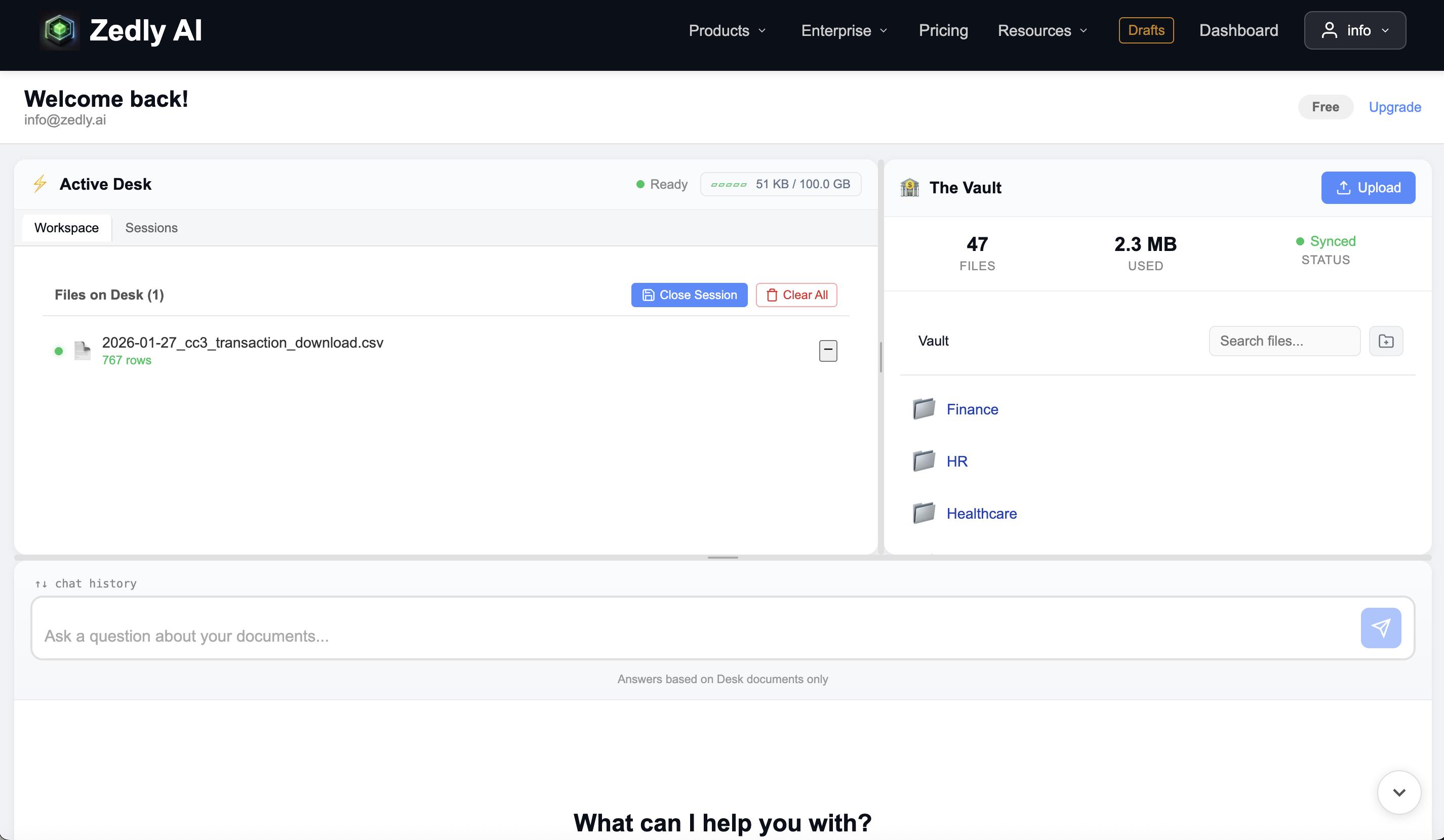
When you need to understand a document, move it to the Desk. The Desk is your active work session: documents on the Desk are processed (text extraction, chunking, embedding) so you can query them.
Ask questions in natural language: "What is the termination clause in the Acme contract?" or "Show me all transactions over $5,000 in the January statement."
Get cited answers: Every response includes page numbers and section references so you can verify the source.
Query across multiple documents: Add several contracts to the Desk and ask "which of these agreements have auto-renewal provisions?" The AI searches across all of them.
Extract structured data: Pull tables from bank statements, categorize transactions, extract contract clauses into structured formats.
Processing happens in ephemeral containers: Modal for document ingestion, E2B sandboxes for code execution. Each container is destroyed after the job completes. When you are done working, clear the Desk. Embeddings and working data are deleted; the original file stays safely in the Vault.
Step 4: Export What You Need, Delete What You Do Not
Export analysis results in the format your workflow requires:
CSV and Excel: For extracted transactions, categorized data, comparison tables
QBO and QFX: For direct import into QuickBooks and other accounting software (Starter plans and above)
Review your Vault periodically. Delete documents you no longer need. If you are in a regulated industry, set retention policies that match your compliance requirements. For HIPAA workspaces, retention can be configured to 30, 60, 90, 180, or 365 days.
Private Vault vs DMS vs Client Portal vs Virtual Data Room
These categories overlap in search results, but they serve different needs. Here is how to decide which one (or which combination) fits your situation.
Private vault (Zedly): Secure storage + private AI analysis + ephemeral processing. Best for internal teams who need to store sensitive documents and understand what is inside them without sharing externally. You upload, you ask questions, you export results. No client-facing portal, no workflow automation. The strength is private document understanding on independent infrastructure.
Document management system (DocuWare, M-Files, SharePoint): Workflows, approvals, version trees, audit trails, and metadata-driven organization. Best for teams with formal document lifecycle processes: legal departments, compliance teams, and organizations that need to track every touch on every document.
Client portal (SmartVault, ShareFile, Citrix): External sharing with branded upload portals, granular permissions, and client-facing access controls. Best for accounting firms, law firms, and professional services that send and receive documents with clients regularly.
Virtual data room (Intralinks, Datasite): Deal-specific, time-limited, heavy audit trails, watermarking, and Q&A workflows. Best for M&A due diligence, fundraising, and transactions where dozens of parties need controlled access to sensitive deal documents.
If you need both private analysis and external distribution, use them together: Zedly for understanding your documents privately, and your existing sharing tool (or a DMS/portal) for distributing files to clients and partners.
The Vault stores your documents; the Desk is your active work session with AI Chat.
Where Zedly Fits
The Vault and Desk Model
Zedly separates storage from analysis. The Vault holds your documents: encrypted, isolated in dedicated Backblaze B2 buckets, available whenever you need them. The Desk is your active work session: move a document onto the Desk to analyze it, ask questions, extract data, and clear the Desk when you are done. Storage is persistent; analysis is ephemeral.
Not on AWS, Azure, or Google Cloud
Document storage runs on Backblaze B2, independent infrastructure that is not operated by a hyperscaler. Your files are erasure-coded across 20 storage pods using Reed-Solomon encoding (17 data shards + 3 parity shards), which means the system tolerates up to 3 simultaneous pod failures without data loss. Object Lock provides ransomware protection. Backblaze is SOC 2 Type 2 certified. No hyperscaler touches your files at rest.
AI Chat That Actually Understands Your Documents
This is not keyword search. Zedly uses semantic search (Voyage AI embeddings, 1024-dimension vectors) to understand what you are asking and retrieve relevant passages from across your entire document set. Ask a question in natural language, get an answer with page numbers and section references. Query across multiple documents simultaneously. Use domain-specific analysis modes for legal, financial, and medical documents.
For data files (CSV, Excel), Zedly generates and executes Python code in isolated E2B sandboxes to analyze your data: categorize transactions, identify anomalies, generate charts, and produce structured outputs. The sandbox is a Firecracker MicroVM that is destroyed immediately after execution.
No training: Your documents are never used to train or improve models
Ephemeral processing: Modal containers and E2B sandboxes destroyed after every job
Retention controls: Delete on demand, configurable retention for HIPAA workspaces
Presigned URLs: The Zedly server never touches your file bytes directly
What Zedly Does Not Do (Yet)
Transparency about scope prevents mismatched expectations:
No client portal or external sharing links
No user-facing audit trail (application events are logged internally)
No e-signature workflows
No role-based access with granular permission trees
These features are on the roadmap. Today, Zedly is a private document vault with powerful AI analysis, not a document management system. If you need sharing and audit capabilities now, pair Zedly with a DMS or client portal for external distribution.
Frequently Asked Questions
What is the difference between encrypted storage and a private document vault?
Encrypted storage protects files at rest (AES-256 is standard) and in transit (TLS). A private document vault adds a working layer on top: you can search inside documents, ask questions in natural language, extract tables and clauses, and get cited answers with page numbers. Encryption keeps files safe. A vault lets you actually use them without exposing them to public AI tools or shared cloud infrastructure.
Can I share files with clients from a private vault?
Zedly does not currently offer link sharing or client portal features. If you need to send files externally, export the results you need (extracted tables, summaries, structured data) and share those through your existing tools. For raw file distribution, keep using your current sharing tool (Drive, Dropbox, ShareFile) alongside Zedly for private analysis. Sharing features are on the roadmap.
Does a private vault need audit logs?
For compliance-heavy industries (healthcare, legal, finance), user-facing audit logs are important. Zedly logs application events internally but does not yet offer a user-facing audit trail. If your compliance requirements include detailed access logging, pair Zedly with a document management system that provides audit capabilities. For most small businesses focused on private analysis rather than regulated document distribution, vault-level controls (retention policies, deletion, user isolation) cover the core requirements.
Do I need on-premise storage, or is cloud safe enough?
Cloud storage can be safe if you choose the right provider. The key questions are: who operates the infrastructure, is your data isolated from other customers, and is the provider SOC 2 Type 2 certified? Zedly stores documents on Backblaze B2 (not AWS, Azure, or Google Cloud), which is SOC 2 Type 2 certified and uses erasure coding across 20 storage pods for durability. On-premise is necessary only when regulations require it (ITAR, certain CMMC levels, air-gapped environments).
How does ephemeral processing protect my documents?
When you analyze a document on Zedly's Desk, processing happens in single-use containers (Modal for document ingestion, E2B sandboxes for code execution). These containers are destroyed immediately after each job completes. No persistent storage, no leftover data, no reuse. Your document content passes through the container, produces results, and the container ceases to exist. This is fundamentally different from cloud AI tools that retain your data for training or quality improvement.
What should a retention policy look like for a small business?
Start simple: keep documents as long as you need them, delete when you do not. For regulated documents (tax returns, HR records, contracts), follow the legal minimums for your industry and jurisdiction. Zedly supports on-demand deletion and configurable retention policies. A practical default: keep active documents in the Vault indefinitely, clear your Desk after each analysis session, and review your Vault quarterly to remove documents you no longer need.
Is a virtual data room overkill for a small business?
Usually, yes. Virtual data rooms (Intralinks, Datasite) are built for M&A due diligence, fundraising, and deal-specific document exchange. They come with heavy audit trails, granular permissions, watermarking, and enterprise pricing. If you are not running a transaction that requires those controls, a private vault with AI analysis capabilities covers your needs at a fraction of the cost and complexity.
Ready to try a private document vault?
Upload a PDF, move it to the Desk, and ask a question. Cited answers, structured extraction, and ephemeral processing. Your documents stay on independent infrastructure, never used for training. Start Free →
Comparing enterprise AI platforms?
See a detailed breakdown of deployment, compliance, pricing, and document features.